Staying connected on Instagram with a Huawei phone is completely straightforward in 2026. Even without native Google services pre-installed, Huawei users can still capture, edit, and share moments on the world’s premier visual social network without compromise. Achieving smooth huawei instagram performance is a breeze when using Huawei’s built-in AppGallery alongside the GBox app. This comprehensive 2026 guide explains exactly how to download, launch, and fine-tune Instagram on your Huawei smartphone so you can browse your feed, upload Stories, create viral Reels, and message friends effortlessly.
How GBox Delivers Safe and Reliable Instagram Access
Rigorous Security Audits and Native-Like Speed
Safety comes first for Huawei users, and GBox provides peace of mind by undergoing strict verification before being offered through AppGallery. Because Instagram occasionally relies on Google frameworks for background tasks, running it through GBox ensures every component functions without errors. Not only does GBox simplify huawei instagram installation, but it also preserves fast loading times and complete feature support—from logging in and browsing the Explore grid to adding music stickers on Stories and watching Reels. By integrating GBox with AppGallery, Huawei continues to give users a dependable gateway to essential global apps in 2026.
One Virtual Environment for All Your Favorite Apps
GBox removes the friction of managing international apps on Huawei hardware. Once you set up GBox for the first time, it acts as a universal support layer for other popular apps you install down the road. Instead of dealing with compatibility warnings or missing service prompts, GBox handles the technical heavy lifting quietly in the background, unlocking a complete mobile app experience on your Huawei device.
Quick Steps to Install Instagram on Your Huawei Phone
Locating Instagram in Huawei AppGallery
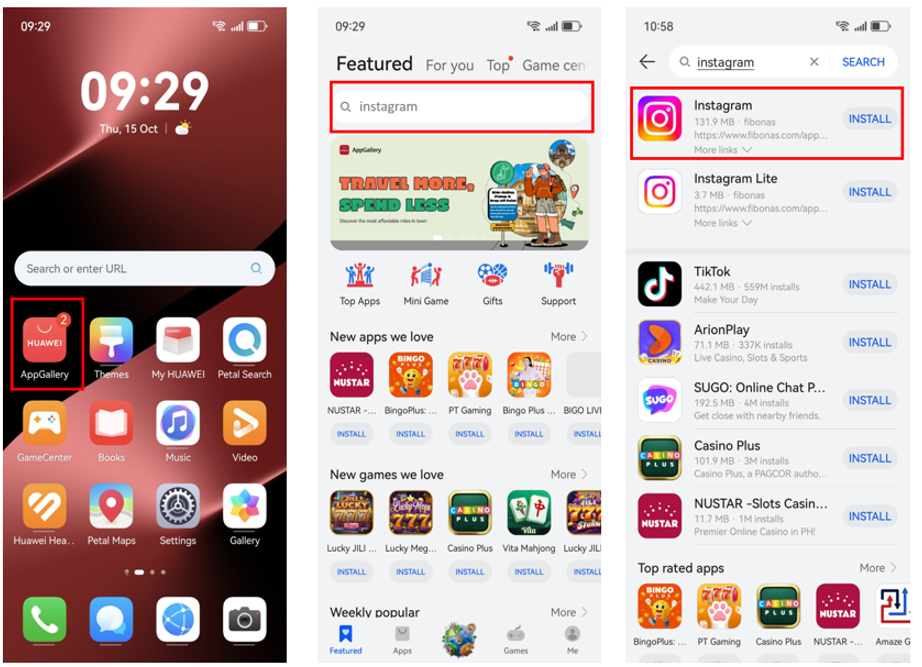
Begin by opening AppGallery, the official app store included on every Huawei smartphone. Tap the search field at the top of the screen, type “Instagram,” and select the official app from the dropdown results. Depending on your current region and Huawei model in 2026, you can tap the install button right away. If additional framework support is needed, AppGallery will guide you through a quick GBox setup so that huawei instagram runs without any limitations.
Setting Up the GBox Compatibility Tool
If prompted while installing Instagram, simply tap “Install” to add GBox to your handset. Within moments, GBox will configure itself in the background to support Instagram and other global applications that depend on Google services. Using AppGallery to install both Instagram and GBox ensures you always get verified, up-to-date software with minimal effort.
Opening Instagram and Logging Into Your Account
Once the download finishes, you will find the Instagram and GBox icons ready on your home screen. Tap the Instagram icon, sign in with your username and password, and start scrolling. All of Instagram’s signature tools work seamlessly: sharing multi-photo posts, replying to Stories, recording Reels with visual effects, and chatting in group DMs. With GBox working behind the scenes, huawei instagram delivers the smooth, responsive experience you expect from a modern smartphone in 2026.
See also: Digital Evolution: Reshaping HR Practices within London’s Tech Hubs
Simple Adjustments to Enhance Instagram on Huawei
After getting Instagram set up, a few minor settings tweaks can make your everyday usage even smoother. Make sure to keep GBox updated via AppGallery so your phone receives the latest 2026 performance enhancements. If you ever experience late push notifications for Direct Messages or live broadcasts, check your Huawei battery settings and allow GBox to run in the background without power restrictions. Furthermore, toggling on high-quality media uploads inside Instagram’s settings ensures photos and videos shot on your Huawei camera look their absolute best. These quick adjustments help keep huawei instagram running flawlessly day after day.