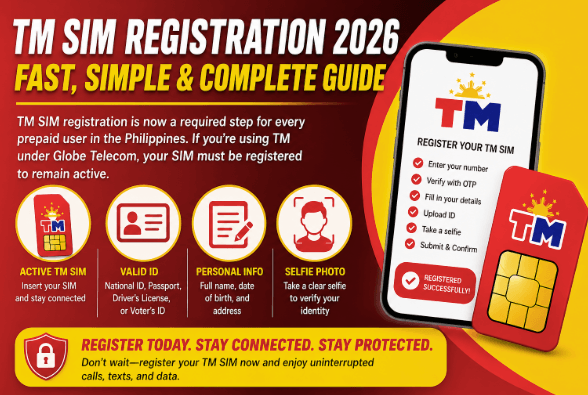
The SIM Registration Act (Republic Act No. 11934) continues to govern mobile telecommunications in the Philippines throughout 2026. As the country’s largest mobile network provider with over 55.2 million subscribers, Smart Communications maintains strict compliance protocols to protect users from scams, identity theft, and cybercrime while ensuring uninterrupted service.
Whether you’re a new subscriber activating a fresh SIM card or an existing user verifying your registration status, understanding Smart SIM registration requirements is essential to avoid automatic deactivation and potential legal penalties.
Why Smart SIM Registration Remains Mandatory in 2026
Ongoing Legal Compliance
The Philippine government continues enforcing RA 11934 to combat text scams, smishing attacks, and anonymous criminal activities. All mobile users—whether on Smart, TNT, or Sun Cellular brands—must maintain registered status to access network services legally.
New SIM Activations
Every newly purchased Smart SIM must be registered before activation or immediately upon insertion. Retailers are prohibited from selling pre-activated SIM cards, ensuring all numbers link to verified identities from day one.
Service Continuity
Unregistered Smart SIMs face immediate deactivation, cutting off voice calls, SMS, and mobile internet access. In 2026, the National Telecommunications Commission (NTC) and Smart continue periodic purges of unregistered numbers to maintain database integrity.
2026 Smart SIM Registration Requirements
Essential Personal Information
Prepare these details exactly as they appear on your government ID:
- Full Legal Name (first, middle, last)
- Date of Birth (MM/DD/YYYY format)
- Gender
- Nationality
- Complete Residential Address (street, barangay, city, province, ZIP code)
- Active Smart Mobile Number (10-digit format: 9XX1234567)
- SIM Serial Number (found on the SIM card or packaging)
Valid Government-Issued IDs (2026 Updated List)
Primary IDs:
- Philippine National ID (PhilSys)
- Passport
- Driver’s License
- SSS ID / UMID Card
- Voter’s ID
- PRC ID (Professional Regulation Commission)
- NBI Clearance
Secondary IDs:
- Senior Citizen ID
- PhilHealth ID
- OWWA ID
- IBP ID (Integrated Bar of the Philippines)
- BIR ID
- PWD Card
- Government Service Insurance System (GSIS) e-Card
Critical 2026 Update: Smart emphasizes using PVC-type plastic IDs with embedded security features. Paper-based IDs, laminated cards, or photocopies may face rejection or extended verification delays.
Verification Selfie Requirements
- Clear, well-lit photograph with plain background
- No face masks, sunglasses, or head coverings (except for religious purposes)
- Match the photo on your submitted ID
- File size typically under 4MB
How to Register Your Smart SIM in 2026: Four Methods
Method 1: Smart Online Registration Portal (Recommended)
The official smart.com.ph/simreg portal remains the primary registration channel for prepaid subscribers:
Step-by-Step:
- Access the Portal: Visit smart.com.ph/simreg
- Enter Mobile Number (e.g., 9181234567)
- Accept Terms: Tick the box confirming you’ve read the Terms and Conditions
- Request OTP: Click “Send OTP” and wait for the 6-digit code via SMS
- Verify Identity: Enter the OTP and click “Verify”
- Select Nationality: Choose Filipino or Foreign National
- Upload Documents: Submit clear photos of your valid ID and take a live selfie
- Complete Profile: Enter ID number, full name, date of birth, and gender exactly as shown on your ID
- Provide Address: Input your complete residential address and active email
- Review and Submit: Confirm all details, tick the attestation checkbox, and click “Next”
- Save Control Number: Record your unique registration certificate number for future reference
Pro Tip: The Smart registration portal is zero-rated—Smart subscribers won’t incur data charges when accessing the site using mobile data.
Method 2: GigaLife App (Most Convenient for Smart Users)
- Download the GigaLife App from Google Play Store or Apple App Store
- Log in or create a Smart account
- Navigate to the SIM Registration section
- Follow prompts to enter your number and verify via OTP
- Upload ID and selfie directly through the app camera
- Submit and receive instant confirmation
Method 3: Smart Stores (Assisted Registration)
- Visit any Smart Store or Smart Service Center nationwide
- Bring your Smart SIM and valid government ID
- Store personnel will guide you through the process
- Ideal for elderly users, those without internet access, or complex cases
Method 4: Postpaid Confirmation (Existing Subscribers)
- Text “YES” to 5858 from your Smart Postpaid number
- Smart confirms registration using your existing account documents
- Receive SMS confirmation within 24 hours
Special Registration Scenarios in 2026
For Minors (Under 18 Years Old)
- SIM must be registered under parent or legal guardian
- Guardian must provide valid ID and consent
- Minor’s information may be included as the end-user
- Guardian assumes legal responsibility for the number
For Foreign Nationals and Tourists
Tourists (30-Day Validity):
- Valid passport (biographical page)
- Proof of Philippine address (hotel booking, rental agreement)
- Return ticket showing departure date
Foreign Residents:
- Valid passport
- Alien Certificate of Registration Identity Card (ACR I-Card)
- Employment permit or school registration
- Proof of local address
For Persons with Disabilities (PWDs)
- Authorized representative may complete registration on behalf of the PWD
- Representative must present valid ID plus PWD ID of subscriber
For Corporate and Business Entities
- Register under company name or authorized representative
Required documents: - SEC Certificate of Registration or DTI Permit
- Board Resolution or Secretary’s Certificate
- Valid ID of authorized signatory
- Proof of Authority to represent the company
See also: The Role of Technology in Disaster Management
How to Verify Your Smart SIM Registration Status
| Method | Instructions |
| SMS Verification | Text SIMREG to 8080 |
| USSD Code | Dial *123# → Select “SIM Registration Status” |
| GigaLife App | Check profile settings for “Registered” badge |
| Online Portal | Visit smart.com.ph/simreg and enter your number |
| Hotline | Call Smart Customer Care at (02) 8888-1111 |
Penalties for Non-Compliance in 2026
For Individual Subscribers:
- SIM Deactivation: Permanent loss of number and service
- Criminal Liability: 6 months to 2 years imprisonment for fraudulent registration
- Financial Penalties: ₱100,000 to ₱300,000 fine for submitting false information
For Telcos Like Smart:
- ₱100,000 to ₱1,000,000 for refusing valid registration
- ₱500,000 to ₱4,000,000 for data privacy breaches
Troubleshooting Common 2026 Registration Issues
| Problem | Solution |
| OTP not received | Check signal strength; ensure number is active; click “Resend OTP” after 90 seconds |
| ID upload rejected | Use PVC ID (not paper); ensure all corners visible; check file size under 4MB |
| Selfie verification failed | Use plain background; remove glasses/hats; ensure adequate lighting; face camera directly |
| Details don’t match ID | Verify spelling and format match exactly; check for extra spaces or special characters |
| Portal loading issues | Clear browser cache; try incognito mode; use alternative browser or device |
| Already registered but forgot | Check status via *123# or SMS SIMREG to 8080; do not re-register |
Benefits of Smart SIM Registration Beyond Compliance
- Enhanced Security Protection: Reduced exposure to SIM swap fraud and identity theft
- Uninterrupted Service: No risk of sudden deactivation
- Exclusive Promos: Access to GigaLife app rewards and registered-user-only offers
- Faster Customer Support: Verified identity enables quicker account recovery
- Digital Identity Verification: Facilitates easier access to government e-services and financial apps
2026 Updates and Future Considerations
Biometric Integration
Smart explores enhanced biometric verification including liveness detection during selfie capture to prevent deepfake fraud attempts.
eSIM Registration
Smart requires the same registration process for embedded SIMs, with serial numbers found in device settings.
Data Privacy Safeguards
Subscriber data remains confidential and is only disclosed through valid court order or law enforcement request.
Frequently Asked Questions (2026 Updates)
- Is Smart SIM registration still required in 2026?
Yes. All new SIMs must be registered before use, and existing subscribers must maintain valid registration. - Can I register multiple Smart SIMs under my name?
Yes, up to nine SIM cards across all networks. - What if I bought a Smart SIM from an unofficial seller?
You can still register it using your own identity. - Do I need to re-register if I change address or get a new ID?
Only if your name changes or you replace your primary ID. - I’m an OFW. How do I register while abroad?
Use the online portal or GigaLife app with international internet access. - What happens to my Smart load balance if my SIM deactivates?
Unregistered SIMs forfeit all remaining load balances and promotional credits.
Conclusion
Smart SIM registration in 2026 remains a critical legal requirement for all mobile users in the Philippines. With multiple registration channels—from online portal and GigaLife app to assisted in-store support—Smart ensures compliance is accessible for every subscriber type.
Don’t risk deactivation. Verify your registration status today, and complete registration immediately to enjoy uninterrupted Smart services, enhanced security, and exclusive subscriber benefits.